_edited.png)
Cluttered vs Clean: Your GBP Photos aren’t Ugly by Accident

Updated: Sep 9

Poor Google Business Profile Photos usually aren't a design-skill problem. They become ineffective when one image tries to carry a logo, offer, service list, arrows, icons, phone number, and several colors at once.
That crowded graphic may look busy on a desktop screen. On Google Maps, it often becomes a tiny, unreadable blur that hides the actual business. Clear business photos of your storefront, team, work, or customer-ready space usually say more because customers can recognize them instantly.
For local owners managing their own business listing, the fix is often subtraction, not another design tool.
Key Takeaways
Clean photos on your Google Business Profile keep one real subject in focus and leave space around it.
Text-heavy graphics become hard to read in Google Maps thumbnails and mobile crops.
Google asks for well-lit, minimally altered images that represent reality.
A useful library of high-quality photos covers the exterior, interior, team, products or services, and atmosphere.
Fresh, authentic images can support more profile engagement than dense promotional artwork.
Cluttered vs Clean GBP Photos
A cluttered Google Business Profile image looks like a flyer squeezed into a photo slot. It may contain text blocks in every corner, competing fonts, several colors, callout bubbles, numbered icons, arrows, discount badges, and a logo covering the subject.

On a Google Business Profile, the business itself should remain the visual focus. A restaurant's food disappears behind a menu graphic. A contractor's finished work becomes background decoration. A salon photo turns into an advertisement with a tiny image of the actual space.
Clean Google Business Profile photos have one obvious subject, enough open space, natural lighting, and an honest view of what customers will encounter. High-quality photos don't need perfect styling. A slightly imperfect but sharp photo of a real waiting room feels more believable than a stock-style collage.
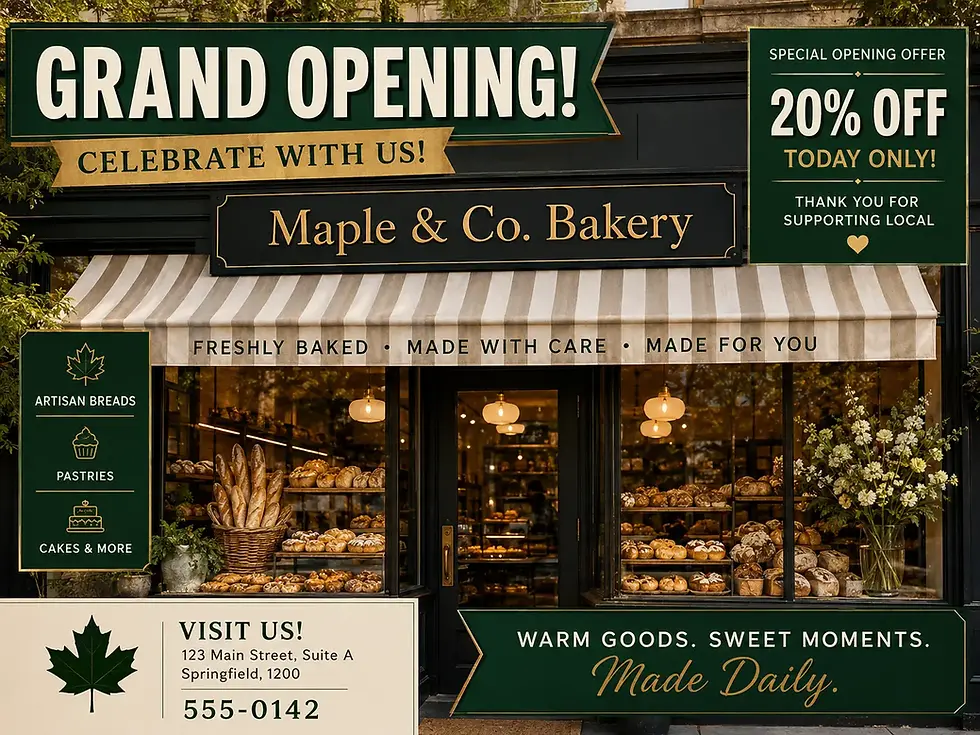
The real problem is trying to make one photo say everything
Owners add extra information because they want one image to explain every service, promotion, location detail, and selling point. That urge creates a presentation slide instead of a useful business photo.
Separate images work better. This visual content gives each service or customer experience its own job. A restaurant can upload a clear exterior, a plated dish, a dining-room photo, and a staff photo. Customers can scan the profile without decoding a crowded graphic.
The same logic applies to service businesses. A roofer can show a branded vehicle, a completed roof, a crew at work, and a close-up of clean workmanship. Those photos give customers proof without forcing them to read tiny text.
Why a plain photo can build more trust than a polished graphic
Google's photo guidance says images should "represent reality." That standard matters because people use a Business Profile to decide where to call, visit, or request directions.
A heavily altered composite may look polished, but it can also feel detached from the real business. Clear photos of the location, team, products, and completed work make a simpler promise: this is what you can expect. Recognizable, authentic images also support the broader local SEO experience.
The strongest profile photo often answers one question in a second: "Can I recognize this business when I get there?"
What Google Actually Wants From Your Business Profile Photos
Google's photo guidelines for a Google Business Profile accept JPG and PNG file formats. Each file must be between 10 KB and 5 MB, keeping the file size within Google's limits. Google recommends 720 by 720 pixels and accepts a minimum of 250 by 250 pixels. Use these dimensions as a practical photo resolution baseline.
Photos should be in focus, well lit, and minimally altered. Basic crops and light exposure corrections are fine. Heavy filters, unrealistic color treatment, or edits that change customer expectations can violate content policies and create a trust problem.
Use these sizes as practical starting points, not guarantees:
Asset | Recommended size | Ratio |
|---|---|---|
Profile photo | 720 x 720 pixels | 1:1 |
Cover photo | 1024 x 576 pixels | 16:9 |
Post image | 1200 x 900 pixels | 4:3 |
Google can crop photos differently across Search, Maps, and mobile. Your cover photo may be cropped as well, so don't place a face, sign, product, or other important visual detail against the edge.
The five photo categories that make a profile feel complete
A complete Google Business Profile should show different parts of the customer experience. This helps your business listing feel current and supports local SEO through better customer understanding, not guaranteed rankings. Build your library with exterior photos, interior scenes, team photos, product photos or service examples, and atmosphere images.
A storefront business might show its entrance, sales floor, staff, best-selling items, and a busy but tidy customer area. A neighborhood plumber can show a service vehicle, organized equipment, a technician, completed repairs, and an honest image of the work process.
Why Cluttered GBP Images Lose Attention on Google Maps
Clutter fails for practical reasons. People often encounter Google Business Profile images as small thumbnails beside a business listing on Google Maps. At that size, readable imagery supports the local SEO user experience; small text, icons, and fine details become visual noise.
A single storefront, person, product, or finished project still reads when reduced. A packed image does not. Mobile searchers make quick choices, often deciding whether to call, get directions, visit a website, or keep scrolling.
Cropping can remove the message you worked hardest to add
Google may display the same photo in several placements and shapes, including your cover photo. A carefully placed discount badge may vanish in one crop. A logo photo or important detail near the edge can disappear. Text split across the frame may become incomplete or misleading.
Keep the main subject centered both vertically and horizontally. Leave room around it. Then view the image at thumbnail size before uploading.
Photos should show the business, not replace it with a flyer
Standard profile photos should show the real storefront, workspace, product, team member, or finished service. A graphic that covers most of the frame removes the evidence customers came to see.
Offer posts can sometimes include short promotional text, but promotional graphics must still follow Google's content policies. Keep it to one high-contrast line with generous margins. Skip phone numbers, long URLs, keyword-heavy claims, multiple calls to action, arrows, and badge piles.
The Data Favors More Useful Photos, Not More Information in Each Photo
GMB Daddy observation offers directional evidence about Google Business Profile performance. It is reported that profiles with photos may receive 30% to 50% more listing views than average, while businesses with 10 or more photos may see roughly twice the engagement.
These findings are directional, not a guarantee. They don't prove a direct lift in local search rankings. Still, they point toward a clear practice: add real, current, well-lit business photos over time as part of a consistent local SEO approach.
Fresh visual proof helps customers decide faster
Recent photos reassure customers that your business is open, active, clean, and ready to serve them. Replace old images after a remodel, menu change, new equipment purchase, seasonal update, or major team change.
Track profile views, calls, direction requests, website clicks, and customer comments after meaningful updates. Correlation doesn't prove that a photo caused a result, but patterns can guide your next upload.
Five Simple Rules for Cleaner Profile Photos
Center one clear subject and keep the frame open
Choose one subject: the storefront, product, employee, room, or completed job. High-quality photos depend more on a clear subject than expensive equipment. Step back, clean your phone lens, and take several versions. Pick the image that stays clear at a small size.
Use natural light, accurate color, and light editing
Daylight works well for exteriors. Indoors, use even lighting and avoid dark corners. Image optimization can include cropping, brightening, and correcting exposure. Keep colors realistic, and avoid aggressive filters or face-altering edits.
Show each part of the customer experience in its own photo
Restaurants can rotate dishes, dining areas, and staff. Contractors can add completed projects and equipment. Salons can show stations, finished styles, and product photos. Medical offices and professional services can show reception areas, staff, and customer-ready spaces.
Keep text limited when an image truly needs it
Most Google Business Profile Photos don't need text. If an Offer post requires it, use one short line, one readable font, strong contrast, and space around the wording.
Review the image as a customer would on a phone
Shrink the image and check it on a mobile screen. Your business should be obvious in one second. Clear images help users understand your business in local SEO results. Remove photos that are blurry, dated, misleading, over-edited, or dominated by design elements.
A Practical GBP Photo Checklist for Your Next Upload
Before you publish to your Google Business Profile, confirm that the image has:
One clear subject in a real business setting, with no distracting background elements.
Sharp focus, even lighting, and a realistic appearance without heavy editing.
Centered framing, with no important details placed near the edges.
Minimal text, with no cluttered overlays, badges, arrows, or promotional graphics.
A JPG or PNG file format that stays within Google's file size limits.
A role in your cover photo, exterior photos, interior, team, product or service, and atmosphere mix.
A balanced mix of images across your business listing that helps customers understand what you offer.
Compliance with Google's content policies.
A quality-control plan to remove photos that are blurry, outdated, misleading, or over-edited.
Review your profile performance after updates to monitor search visibility and support local SEO. Watch views, calls, direction requests, and website clicks, then keep the image types that help customers understand your business fastest.
Frequently Asked Questions
Do I need a professional camera for GBP photos?
No. A recent smartphone can produce strong photos when the lens is clean, the subject is well lit, and the image is in focus. Honest composition matters more than expensive equipment.
Can I use my logo as my profile photo?
Yes, a logo photo can work well on a Google Business Profile if it is simple and recognizable at thumbnail size. Keep it separate from regular business photos, which should show the actual location, team, products, or services.
Should I delete older photos from my profile?
When deciding whether to remove photos, prioritize images that are misleading, blurry, outdated, or inaccurate. Keep older images that still document a truthful customer experience, including work or products customers can still expect.
Can customers upload photos to my Business Profile?
Yes, customers may contribute customer photos as user-generated content. You can't control every contribution, but you can upload stronger official images and flag photos that are inappropriate or misleading.
Why did Google reject one of my photos?
Google may reject images that break content policies, have poor quality, include prohibited material, or appear misleading. Review the image's upload status and check Google's current rules before trying again.
Clean Photos Make a Clearer First Impression
Your Google Business Profile doesn't need more visual noise to look professional. It needs real proof that helps people recognize your business and feel comfortable choosing it.
A clean photo survives a small screen, an unexpected crop, and a fast decision. Give your business photos one job, keep each image honest, and let your actual business take up the frame.


Comments